Message Settings
Use Message Settings to configure message languages, WhatsApp/Twilio connection, patient notifications, and app notification preferences.
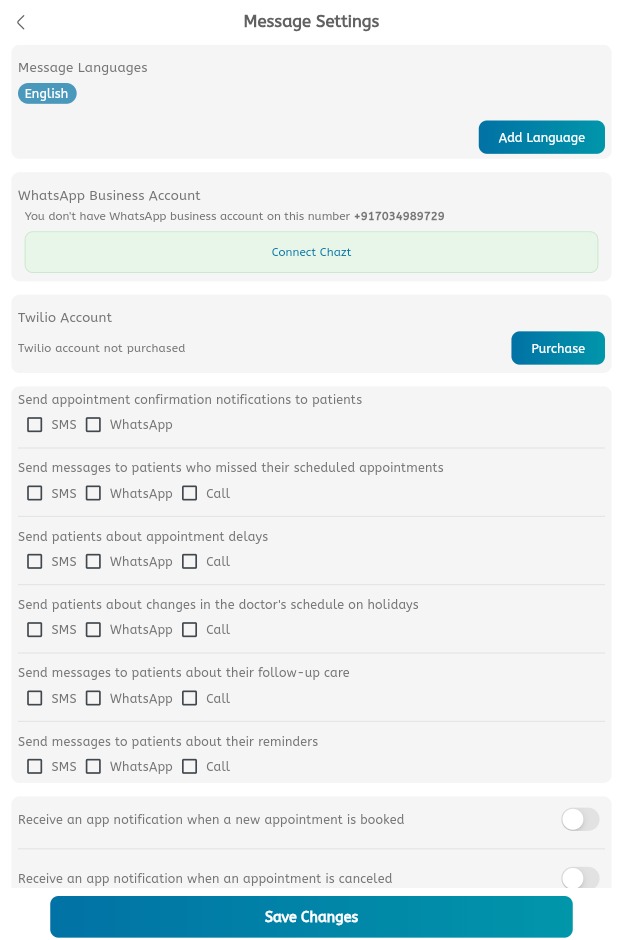
Configure message settings
- Open the main menu.
- Expand Settings.
- Tap Message Settings.
- Review Message Languages.
- Tap Add Language to add another language.
- Review the WhatsApp Business Account section.
- Tap Connect Chazt if WhatsApp is not connected.
- Review the Twilio Account section.
- Tap Purchase if Twilio is required.
- Choose SMS, WhatsApp, or Call for appointment confirmation notifications.
- Choose SMS, WhatsApp, or Call for missed appointment messages.
- Choose SMS, WhatsApp, or Call for appointment delay messages.
- Choose SMS, WhatsApp, or Call for doctor schedule or holiday changes.
- Choose SMS, WhatsApp, or Call for follow-up care messages.
- Choose SMS, WhatsApp, or Call for reminders.
- Enable app notification toggles when required.
- Tap Save Changes.
